Truepod - bit-perfect hi-res music player for the TrimUI Brick Pro. Releases, install guides and terms.
📌 Ghi chú bản phát hành (v0.2.0):
Truepod 0.2.0
*Tiếng Việt: hướng dẫn cài đặt và tính năng*
A bit-perfect music player for the TrimUI Brick Pro.
New in 0.2.0
- ▶No more skips on the speaker and the 3.5 mm jack.
- ▶Rumble on the beat. The motor can knock along with the music. Off by
default; switch it on under Options.
- ▶The DAC keeps its volume. Starting the player no longer turns a USB DAC
up to full.
- ▶Booting with a DAC plugged in no longer loses the buttons.
- ▶B and START on Options go back to Now Playing.
- ▶The built-in output is called "Built-in", not
audiocodec.
<p align="center">
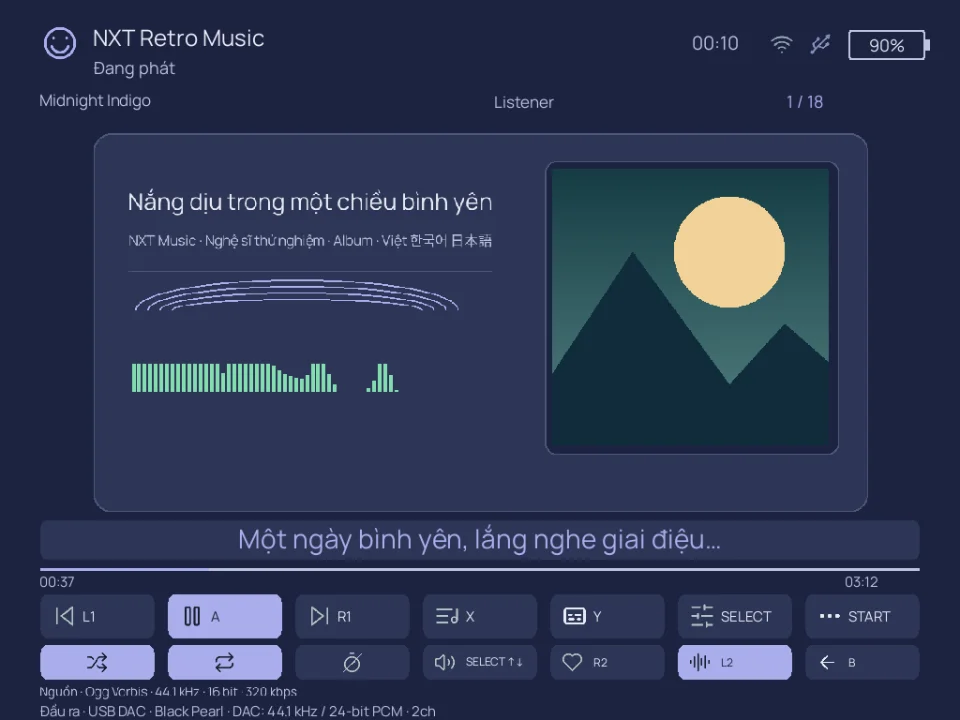
<img src="https://github.com/duyquang6/truepod/raw/main/media/now-playing.gif" width="300" alt="Now Playing, with the spectrum and the LEDs">
<img src="https://github.com/duyquang6/truepod/raw/main/media/wifi-sync.jpg" width="300" alt="Wi-Fi upload from a QR code">
</p>
Every other player on this handheld gives something up. Some cap the output at
44.1 kHz or 16-bit, others resample everything to 48 kHz. The side buttons cannot
turn a USB DAC up or down. Playback stutters, skips, or jumps to the next song.
And the screen has to stay on for the music to keep going, which empties the
battery.
Truepod fixes all of that:
- ▶Full quality. It plays the file at its own sample rate and bit depth, and
tells you when it could not.
- ▶The side buttons control the DAC. The volume keys turn a USB DAC up and
down without costing any quality. A DAC without its own volume keeps its own
buttons.
- ▶No stutters, no skipped songs. Pausing or replugging the DAC never skips
to the next song.
- ▶Screen off, music on. Turn the screen off to save battery while the
music keeps playing.
Free. The quality is not the paid part, and there is no output ceiling in this
build.
Download
| Your firmware | File |
|---|---|
| spruceOS | Truepod-0.2.0-spruceOS.zip |
| stock TrimUI | Truepod-0.2.0-stockOS.zip |
Same player in both. They differ only in which directory the firmware looks in.
Install
- Unzip onto the root of the SD card, and merge the folder when asked. The zip
already carries the right one for your firmware: App/Truepod for spruceOS,
Apps/Truepod for stock TrimUI.
- Put music in
/mnt/SDCARD/MEDIA. Subfolders are how you browse it. - Boot the device and open Truepod.
Features
✅ in Free, ❌ means it is planned for Truepod Pro, which is not released yet.
Free is frozen at what it has now: bug fixes, not new features.
| Free | Pro | |
|---|---|---|
| Hi-res: 24-bit and high sample rates, tested to 88.2 kHz | ✅ | ✅ |
| Bit-perfect through a USB DAC on the top port | ✅ | ✅ |
| FLAC, MP3, WAV, OGG, Opus, M4A / AAC / ALAC | ✅ | ✅ |
| BIT-PERFECT / CONVERTED badge | ✅ | ✅ |
| Folder browsing with each track's real rate and bit depth, cover art, delete | ✅ | ✅ |
| Shuffle, repeat all / one / off | ✅ | ✅ |
| Wi-Fi upload from a QR code | ✅ | ✅ |
| Spectrum display, LEDs flashing to the beat | ✅ | ✅ |
| Screen off with the music still playing | ✅ | ✅ |
| spruceOS and stock TrimUI firmware | ✅ | ✅ |
Browse by artist and album, search, saved .m3u playlists | ❌ | ✅ |
| Favourites, an editable queue, per-track resume | ❌ | ✅ |
| Gapless, EQ | ❌ | ✅ |
| Sync and stream music from Telegram, Spotify, SoundCloud and more | ❌ | ✅ |
| Stream from your own music server (Navidrome and other Subsonic servers), bit-perfect | ❌ | ✅ |
| Use the bottom USB port for a DAC | ❌ | ✅ |
| Updates over the air | ❌ | ✅ |
| A choice of screen layouts, more LED modes | ❌ | ✅ |
| Sleep timer | ❌ | ✅ |
| Vietnamese interface | ❌ | ✅ |
Buttons
| Button | Library | Now playing |
|---|---|---|
| D-pad up/down | move the selection | — |
| A | open folder, or play | play / pause |
| B | up one folder | back to the library |
| X | delete the track (asks first) | shuffle on / off |
| Y | Wi-Fi upload | repeat all / one / off |
| L1 / R1 | page up / down | previous / next track |
| L2 / R2 | — | seek 10 seconds |
| START | go to Now Playing | back to the library |
These work on any screen: SELECT opens Options, MENU quits, the right
stick click turns the screen off with the music still playing, and the side
buttons are volume.
BIT-PERFECT and CONVERTED
The badge says which one you are getting.
BIT-PERFECT — the samples in the file are what reach the DAC. No software
touched them.
CONVERTED — software had to change something on the way, usually the sample
rate. The built-in speaker runs at a fixed 48 kHz, so 44.1 kHz music has to be
resampled for it. A USB DAC on the top port takes the file's own rate, and the
same track plays bit-perfect.
Something broken?
Open an issue on GitHub with your firmware, this version, and truepod.log from the app
folder.